
So here we are again with some amazing stuff, Today we are going To learn about How To Create AFK Channel In Discord?. So first let us know what is AFK CHANNEL AND then dive into how to create.
First of all, You have to be a server owner or admin to have this amazing privilege to make an AFK channel.
WHAT IS AFK CHANNEL?
Basically, AFK Channel means when somebody is showing online but he/she is not exactly online or present at that moment so AFK is a new feature that helps to identify AFK and remove the AFK. To use this AFK FEATURE YOU HAVE TO BE A SERVER OWNER.
HOW TO CREATE AND SETUP AN AFK CHANNEL IN DISCORD WITH FEW EASY STEPS
STEP 1 : Firstly open your discord in mobile or pc and join the server.
STEP 2 : secondly You have to create a new channel.
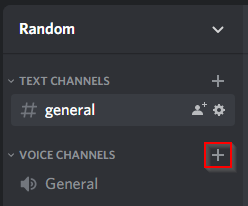
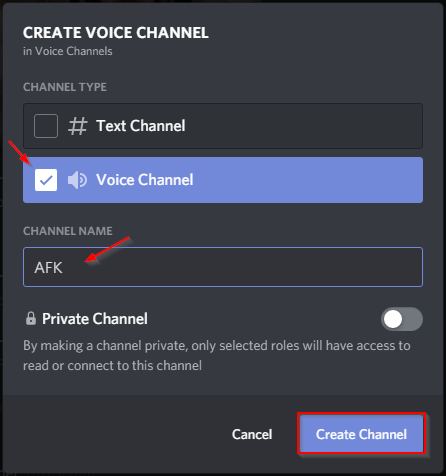
3: Now you have to simply change the type of the channel as shown below to voice channel, Put the channel name ” AFK “. AFTER creating this the channel will appear under voice channels.
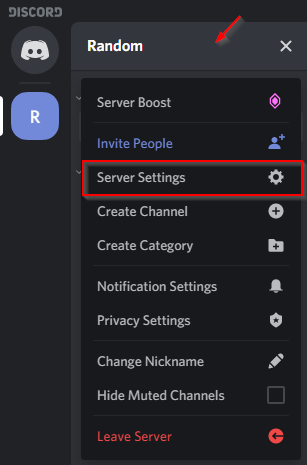
STEP 4: Now go to server settings at the top left after clicking the name of your server.
STEP 5 : NOW in the overview tab select the AFK timeout whatever you want and also set the AFK channel you made.
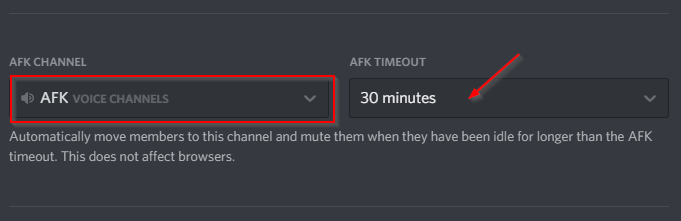
AFK TIMEOUT : It means how long the particular member needs to be a AFK. I personally recommend 20 to 30 minutes.
STEP 6 : Click on save changes and your afk channel is ready to use.
How does Discord know you’re AFK?
So let us know how discord knows that you are an AFK or not. Well, This is a very simple reason behind this AFK BOT. AFK bot is a very advanced bot that automatically scans the USERS activity. The accuracy of this bot is very good.
DON’T MISS THIS!
How to Solve This Error Unable to boot: Kernel requires a x86-64 CPU, but only detected an i686 CPU.
Exclusive Tags : Dropdown menu, Json array…..
Leave a Reply